
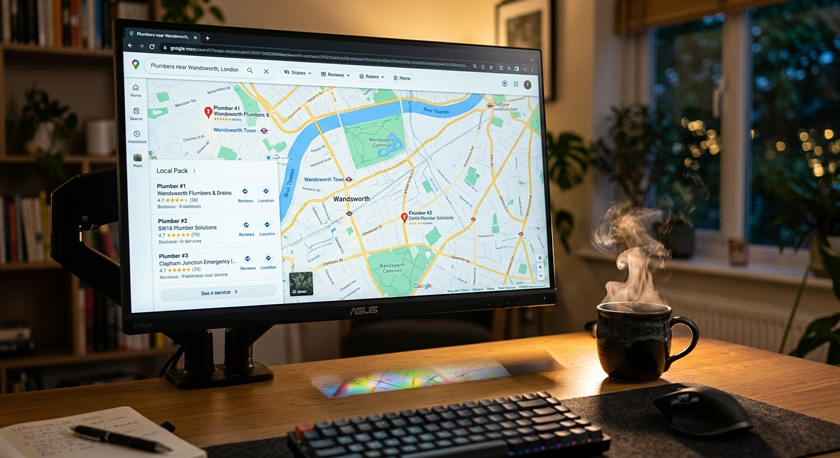
Google Business Profile Optimization for Contractors: The Complete Guide
TL;DR: Google Business Profile optimization for contractors means setting up and actively maintaining your Google listing so Google understands what you do, where you work and whether you're trustworthy. The fields that move the needle are your primary category, your services list, your service area setup, your photo library and your review flow. Most contractor profiles fail on categories and reviews, not on posting frequency. And a profile that ranks but rings out still loses the job, so the follow-up matters as much as the listing.
Every guide on this topic tells you to claim your profile, pick a category and add photos. That advice is fine, and it stops halfway. It ends at the moment the phone rings, which is exactly where most contractors lose the money.
This one covers the profile properly, then covers what happens next.

What Google Business Profile optimization actually means for a contractor
Google Business Profile optimization for contractors is the work of completing, configuring and actively maintaining your Google listing so it ranks in local results and converts the homeowners who see it. It covers categories, services, service areas, description, photos, reviews, Q and A, and messaging. It's ongoing maintenance, not a one-off setup.
Profile optimization is not the same as local SEO. Profile optimization is one component of it. Local SEO also covers your website content, your location pages, citations on other directories, and links pointing at your site.
The difference matters because a contractor can have a decent website and still be invisible in the map pack, purely because the listing is half empty. The listing is the piece with the most direct influence on whether you appear in the three local results Google shows above the blue links.
If you want the wider picture, we've covered local SEO for contractors separately. This guide stays on the profile.
How Google decides which contractors show in the map pack
Google says local results are based primarily on three things: relevance, distance and prominence. Relevance is how well your profile matches the search. Distance is how close you are to the searcher. Prominence is how well known and well reviewed your business is. You can influence two of the three.
Google's local ranking guidance sets it out plainly. Relevance comes from complete, detailed business information, which is why an empty services list hurts you. Prominence comes from reviews, ratings and your wider web presence.
Distance is fixed by where you're based and where the searcher is standing. That's the part contractors argue with. You can't rank in a town forty miles away just by adding it to your service areas.
What you can do is win every search close enough to be winnable, by being the most relevant and most prominent option inside that radius. We've written about the Google Maps ranking myth that costs contractors money if you want the longer argument.
Not sure where you stand? Get a free Google Business Profile audit and see exactly which fields are costing you calls.
Setting up as a service-area business without getting suspended
If you travel to customers and have no signed premises they can visit during your stated hours, you're a service-area business. Google expects you to hide your street address and display a service area instead. Getting this wrong is the most common cause of contractor profile suspensions, and the easiest to avoid.
The rules, from Google's guidelines for representing your business and its service area documentation:
One profile per business if you operate from one base. Not one per town you serve.
No PO boxes, mailbox rentals or virtual offices as your verification address.
Hide the address if there's no permanent signage where customers can turn up.
Up to 20 service areas, set by city, zip code or region.
Keep the overall service area within roughly two hours' driving time of your base.
Hybrid businesses, meaning a real staffed premises plus callouts, can show both an address and a service area.
Contractors working from home should hide the address for two reasons. It's what Google asks for, and it keeps your home off Google Maps. Plenty of profiles we look at have a residential address sitting there in public.
Categories and services: the two fields doing the most work
Your primary category has more influence over which searches you appear in than anything else on the profile. Your services list is the second lever. Together they carry most of your relevance signal, and together they're the two fields contractors most often leave broad or empty.
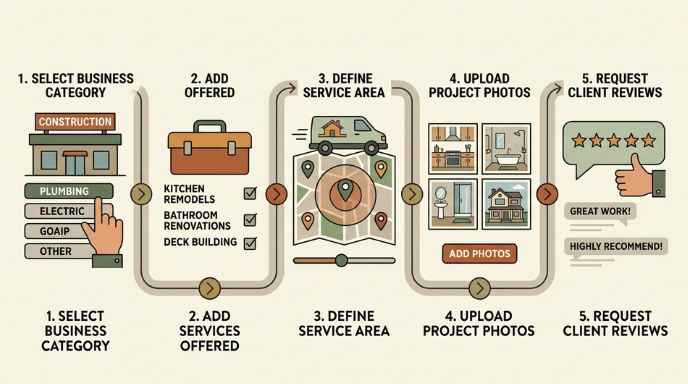
Primary category. Pick the most specific option that describes the work you want more of. "Electrician" over "Contractor". "HVAC Contractor" over "Construction Company". Broad categories feel safer and rank for less.
Secondary categories. Two to four, mapped to services that actually produce revenue. Every irrelevant one you add blurs what Google thinks you are.
Services. Every job you sell, written the way a homeowner says it. "Fuse box replacement", not "distribution board remediation". Each service has a description field. Fill it with a sentence about what the job involves and who it's for.
When we built out a UK contractor's profile from close to nothing, the order was: fix the primary category, add secondaries tied to their real revenue lines, then write out every service in customer language, all before touching photos or posts. Nothing exotic about it. It's just that almost nobody does it thoroughly.
Here's what each field is actually doing, and where contractors usually get it wrong:
Primary category. Decides which searches you're eligible for. Usual mistake: something broad like "Contractor".
Secondary categories. Add further search eligibility. Usual mistake: listing services they rarely sell.
Services list. Matches your profile against the words in the query. Usual mistake: left empty, or written in trade jargon.
Service areas. Decide which locations you can appear in at all. Usual mistake: thirty towns, hours from base.
Description. Carries trust and context, plus minor relevance. Usual mistake: keyword stuffing, or left blank.
Photos. Drive conversion and signal an active listing. Usual mistake: one logo, or stock images.
Reviews. Feed prominence and carry the most conversion weight. Usual mistake: no system, so requests never get sent.
What to write in the business description, and what gets it rejected
The description is 750 characters explaining what you do, where you work and why someone should trust you. It carries less ranking weight than categories, and real conversion weight, because homeowners read it. Google prohibits links, promotional pricing and offers inside it.
Write it in this order: what you do, who for, where, how long you've been doing it, and what makes hiring you straightforward. Mention licensing and insurance if you have them, because that's what a nervous homeowner is scanning for.
Avoid the temptation to list twenty keywords in a row. It reads badly to the person deciding whether to call, and Google's spam policies cover keyword-stuffed profile content. [NEEDS EXPERIENCE INPUT: the worst keyword-stuffed description you've found in an audit, quoted or paraphrased]
Photos, video, and why stock images work against you
Photos are the biggest conversion lever on a contractor profile and one of the clearest signals that a listing is live. Google's content rules don't permit stock photography or images taken from other businesses. Real job photos from your phone are both compliant and more persuasive.
What to upload:
Ten to twenty completed jobs, wide enough to see the finished work.
Before and after pairs where the difference is visible.
The van, ideally outside a real house.
You and the crew, faces visible, in work clothes.
A short clip of finished work, walked through in one take.
Add a handful every month rather than uploading everything once. A profile whose most recent photo is four years old tells homeowners exactly what they'll be dealing with.

Reviews: the part of your profile you can move fastest
Reviews feed prominence, one of the three factors Google names for local ranking, and they're the strongest conversion signal on the listing. Quantity matters, recency matters, and your replies matter. It's also the only area where a contractor starting from zero can visibly overtake an established competitor within months.
The problem is never willingness. Customers are happy to leave one. The problem is that asking gets forgotten by four o'clock, because you're on the next job.
So automate the ask. Here's the flow we set up for that UK contractor, and it's the same one running in our own system:
Job marked complete triggers a review request by text and email.
Up to two reminders over the following weeks if nothing lands.
Four and five star ratings route straight to the Google review link.
Three stars and below route to a private feedback form, so the complaint reaches you instead of the public listing.
Incoming reviews get replies automatically, including the negative ones.
The best reviews get published onto the website as well, so they're not only working in one place.
We typically found that contractors who consistently ask for reviews, get more reviews. The best process is after a job is done, leave your business card with your "review" QR code (we provide and maintain these - free of charge) added on to it so that your customers can review your great work. Reviews compound over time which means the more reviews you have the more jobs you get which leads to more opportunities to ask for reviews
The private feedback route matters more than it sounds. An unhappy customer who gets a form instead of a review link usually tells you what went wrong, which you can then fix. There's more detail in our guide to review generation and reputation for contractors, and a walkthrough of the ask itself in how to get more Google reviews for your trade business.
If the review system is the gap, book a 15-minute call and we'll show you where your profile is losing to competitors.
Posts, Q and A, and messaging: what's worth your time
Google Posts, the Q and A section and messaging are secondary features. They help, they aren't where map pack position comes from, and the advice to post daily was written for businesses with someone sitting at a desk. Here's the realistic version for a contractor on site all day.
Posts. Twice a month. A photo of a finished job and one line about what it was. Ninety seconds. If it slips, nothing catastrophic happens.
Q and A. Seed it yourself. Post the five questions you get asked on every quote call, with your answers. Do you charge for callouts. Are you insured. How fast can you get here. Homeowners read these, and if you leave the section empty someone else may answer for you, wrongly.
Messaging. Only switch it on if the messages land somewhere you'll see them. An unanswered chat request is worse than no chat option at all. In our setup, profile messages arrive in the same inbox as website chat, quote forms, texts and missed calls, so nothing sits unread for two days.
Nine mistakes that quietly bury contractor profiles
Most underperforming contractor profiles aren't broken. They're half finished, and every gap reads to Google as a business that's less established than the competitor who filled theirs in. These are the ones we see most, and what each one costs:
Broad primary category. Cuts the number of searches you're eligible for at all.
Empty services list. Removes your strongest relevance signal.
Home address left visible. Puts your house on Maps and risks a suspension.
Service areas set to thirty towns. Signals vagueness and wins nothing distant.
One photo, or stock photos. Kills conversion and breaks Google's content rules.
City or keywords added to the business name. Against guidelines, and a common cause of suspension.
No review system. Prominence stalls while competitors pull away.
Silence under negative reviews. Reads worse to homeowners than the review itself.
Nobody answering the calls it generates. You paid for the ranking and handed the job to someone else.
That last one is the one nobody writes about, so it gets its own section.
What happens after the profile starts working
A well optimized profile produces phone calls from homeowners who are ready to hire. Those homeowners ring two or three contractors and book whoever responds first. If you're up a ladder when the call comes, the ranking you worked for pays your competitor instead. This is where most contractor marketing quietly leaks.
Three things close that gap.
Missed-call text back. The call rings out, and within seconds the caller gets a text saying you're on a job and will ring back, with a second message shortly after. The lead stays warm while you finish what you're doing.
One inbox. Website chat, quote forms, texts, missed calls and review follow-ups landing in a single place, so nothing sits unread in an app you never open.
Follow-up that runs itself. Most quotes don't get answered on the first attempt. A sequence that checks back, plus a longer drip that reaches past customers with a returning-customer offer and a referral ask, recovers work you've already paid to generate.
With that UK contractor, the profile and the website brought the inquiries in, and the automation is what turned them into booked jobs, because the owner wasn't sitting waiting to reply. [NEEDS EXPERIENCE INPUT: what changed for them in booked jobs or response time] The full mechanics are on our speed-to-lead automation and lead follow-up and reactivation pages.

Where your website fits, and why the profile alone isn't enough
Your profile decides whether a homeowner finds you. Your website decides whether they trust you enough to fill in the form. Contractors with a strong listing and no website, or a site that's four pages of stock photos, lose people at the second step, and they cap how far the listing itself can climb.
Google's prominence factor takes your wider web presence into account, so the site supports the profile rather than competing with it. In practice that means service pages matching the categories and services on your listing, location pages for the areas you actually cover, and a form that responds instantly when someone submits it.
With the UK contractor, the sequence was profile first, then a site built around the same service and location structure, then ads on top once both were converting. Running ads into a weak profile and a weak site is how contractors end up concluding that ads don't work. There's more in websites built for contractors and why contractor websites don't generate leads.
DIY, freelancer or managed: what each one costs
You can do all of this yourself. The real question is whether the maintenance survives contact with a busy month. Here are the three routes, with the same four things named for each, so you can compare them like for like.
Do it yourself
Cost: free, plus your evenings.
What you get: full control, no fee, and every fix in this guide is free to make.
Who it suits: contractors with a quiet stretch and the discipline to keep at it after week three.
The catch: setup gets done, maintenance stops. Reviews and photos are the first things to slide.
One-off freelancer cleanup
Cost: varies, usually a few hundred dollars, once. [NEEDS EXPERIENCE INPUT: typical quotes you've seen contractors given]
What you get: a tidy, correctly configured profile, usually within a fortnight.
Who it suits: contractors whose listing is a mess but who'll genuinely maintain it afterwards.
The catch: it's a snapshot. Review requests, replies and photos stop the day they invoice you.
Managed as a system
Cost: from $167 per month with us.
What you get: profile optimization, a contractor website, automated Google review requests, quote forms with auto-response, and missed-call text back.
Who it suits: contractors on site all day who know they won't keep it up themselves.
The catch: it's a monthly cost, and it only pays back if you answer the work it brings you.
Two things worth saying plainly. Our Google Business Profile work isn't sold as a one-off cleanup, because a one-off cleanup decays. It's bundled into the $167 plan alongside the website and the review automation, since those are the parts that keep it working.
And if you've got the discipline to maintain it yourself, do that. Everything in this guide works whether you pay anyone or not. The service details are on the Google Business Profile optimization service page.
Why an owned profile beats paying Angi or Bark per lead
A Google Business Profile is an asset you own. A directory lead is a rental, sold to four or five contractors at once, which turns the conversation into a price fight before you've spoken to anyone. The profile costs you effort. The directory costs you margin, on every job, forever.
Do the arithmetic on your own numbers. Take what you spend on shared leads in a month, then work out what proportion you actually win once the homeowner is holding three other quotes. [NEEDS EXPERIENCE INPUT: what a contractor you've worked with was spending on shared leads before switching]
The profile route is slower to start, and nobody should pretend otherwise. It takes weeks of profile work and review accumulation before position moves. What you get at the end is a channel where the homeowner calls you specifically, hasn't been handed your competitors at the same time, and isn't comparing you on price alone. We've made the wider case in our comparison of lead directory alternatives for contractors.

Your first 30 days
A realistic order of work for someone doing this around actual jobs. Roughly an hour in week one, then twenty minutes a week after that.
Days 1 to 2. Claim and verify the profile. Fix the primary category. Add two to four secondary categories tied to real revenue.
Days 3 to 5. Hide the address if you're a service-area business. Set your genuine service areas. Check your hours and phone number are right.
Days 6 to 10. Write every service you sell into the services list, in customer language, with descriptions. Write the business description.
Days 11 to 14. Upload ten to twenty real job photos. Add before and after pairs.
Days 15 to 20. Set up automated review requests on job completion. Text your last ten customers a review link manually to get moving.
Days 21 to 25. Seed the Q and A with your five most common quote questions. Publish two posts.
Days 26 to 30. Set up missed-call text back. Check where profile messages and form submissions actually land.
If you want the short version to work through tonight, we've boiled it down to eight profile fixes ordered by what earns calls fastest.
FAQs
How long does Google Business Profile optimization take to show results?
Profile changes such as categories and services are picked up within days, but movement in the map pack usually takes weeks, because prominence builds through reviews and activity rather than a single edit. Contractors starting from an incomplete listing normally notice more profile views before they notice more calls. On average, contractors will see consistent results over the course of 3-4 months. As you receive more reviews and Google sees that your business profile is active, it will recommend your business more.
Can I optimize my Google Business Profile myself, or do I need to pay someone?
You can do all of it yourself. Categories, services, address settings, photos and review requests are free and take a few hours to set up properly. Paying someone makes sense when the maintenance is the part that fails, meaning the review requests, the replies, the photos, and the follow-up on the calls it generates.
Should I hide my address if I run my business from home?
Yes. Google asks service-area businesses without permanent customer-facing signage to hide their street address and display a service area instead. Leaving a home address visible puts your house on Google Maps and is a common reason contractor profiles get suspended or restricted.
How many Google reviews do I need to rank in the map pack?
There's no threshold number. Reviews feed prominence, which Google names as one of three local ranking factors, so what matters is having more and fresher reviews than the contractors ranking around you in your area. Look at the top three profiles for your main search term and work from there.
Why did my Google Business Profile disappear from Google Maps?
The usual causes are a guideline breach or a suspension: keywords added to the business name, a PO box or virtual office as the address, a visible address with no signage, or duplicate profiles for one business. Check your email for a suspension notice, fix the cause, then submit a reinstatement request.
Can I put my city or my services in my business name?
No. Google requires your profile name to match your real-world business name as used on your signage, website and paperwork. Adding "Plumber Boston" to a business actually called Hillside Plumbing breaches the guidelines and is one of the fastest routes to a suspension, even though competitors appear to get away with it.
Do Google Posts actually help contractor rankings?
Posts have a modest effect. They keep the profile looking active and give homeowners recent work to look at, which supports conversion more than position. Posting twice a month captures most of the benefit. Reviews and a complete services list move rankings considerably more than posting frequency does.
What's the difference between Google Business Profile optimization and local SEO?
Profile optimization covers your Google listing: categories, services, service areas, photos, reviews and Q and A. Local SEO is broader, and includes your website content, location pages, directory citations and backlinks. Profile optimization is the component with the most direct influence on map pack position, and the one most often neglected.
How much does Google Business Profile management cost for contractors?
Pricing varies widely, and many agencies won't publish it. Ours is public: profile optimization is included in the $167 per month plan, alongside a contractor website, automated Google review requests, quote forms with auto-response and missed-call text back. One-off cleanups cost less and decay, because the profile needs ongoing activity.
What to do next
Google Business Profile optimization for contractors comes down to a specific primary category, a properly configured service area, a services list written in customer language, real job photos, and a review system that runs without you. Then answering, or automatically texting back, everyone it brings in.
Get a free Google Business Profile audit and we'll tell you exactly which fields are costing you calls, and what the contractors above you have that you don't.